 Arbitrum docs
How to bridge from child chain to parent chain
Step-by-step guide to programmatically withdraw ETH and send messages from an Arbitrum child chain to Ethereum using ArbSys and the Outbox contract.
This guide explains how to programmatically send messages and withdraw assets from an to a (such as Ethereum). For conceptual information about the messaging protocol, see Child-to-parent chain messaging.
Prerequisites
- A child chain with funds
- Access to parent chain infrastructure (for executing the final step)
- Awareness that child-to-parent messages require 6.4 days to finalize
Overview of the process
Child-to-parent chain messaging follows these steps:
- Send message on child chain: Call
ArbSys.sendTxToL1to initiate the message - Wait for finalization: The message enters a 6.4-day
- Execute on parent chain: After finalization, call
Outbox.executeTransactionto complete the transfer
Sending a message from the child to the parent chain
To send a message from the child chain to the parent chain, use the ArbSys precompile's sendTxToL1 method:
function sendTxToL1(
    address destination,
    bytes calldata data
) external payable returns (uint256)
Parameters
destination: The parent chain address that will receive the messagedata: Calldata to send to the destination address on the parent chain
Return value
Returns a unique identifier for the message, used to track its status and construct the proof for execution.
The ArbSys precompile is located at address 0x0000000000000000000000000000000000000064.
Example: Sending a simple message
const arbSys = new ethers.Contract('0x0000000000000000000000000000000000000064', arbSysABI, childChainSigner);

const tx = await arbSys.sendTxToL1(parentChainDestination, ethers.utils.toUtf8Bytes('Hello from L2!'));
const receipt = await tx.wait();
Executing the message on the parent chain
After the 6.4-day challenge period, you can execute the message on the parent chain.
Step 1: Retrieve proof data
Use the NodeInterface contract to get the Merkle proof:
function constructOutboxProof(
    uint64 size,
    uint64 leaf
) external view returns (
    bytes32[] memory proof,
    uint256 path,
    address l2Sender,
    address l1Dest,
    uint256 l2Block,
    uint256 l1Block,
    uint256 timestamp,
    uint256 amount,
    bytes memory calldataForL1
)
Parameters:
size: The number containing your messageleaf: The index of your message within the batch (0-indexed)
Example usage:
const nodeInterface = new ethers.Contract('0x00000000000000000000000000000000000000C8', nodeInterfaceABI, childChainProvider);

const proofData = await nodeInterface.constructOutboxProof(batchNumber, indexInBatch);NodeInterface is a "virtual" contract accessible at 0x00000000000000000000000000000000000000C8. It isn't a true precompile but provides Arbitrum-specific data without requiring a custom RPC.
Step 2: Execute on the parent chain
Call Outbox.executeTransaction with the proof data from Step 1:
function executeTransaction(
    bytes32[] calldata proof,
    uint256 path,
    address l2Sender,
    address l1Dest,
    uint256 l2Block,
    uint256 l1Block,
    uint256 timestamp,
    uint256 amount,
    bytes calldata calldataForL1
) external
All parameters come from the constructOutboxProof call. The method executes the message at the l1Dest address with the provided calldata and amount.
Example usage:
const outbox = new ethers.Contract(outboxAddress, outboxABI, parentChainSigner);

const tx = await outbox.executeTransaction(proofData.proof, proofData.path, proofData.l2Sender, proofData.l1Dest, proofData.l2Block, proofData.l1Block, proofData.timestamp, proofData.amount, proofData.calldataForL1);
await tx.wait();
Withdrawing ETH
To withdraw ETH from the child chain, use the ArbSys precompile's withdrawEth method:
function withdrawEth(
    address destination
) external payable returns (uint256)
Parameters
destination: The parent chain address that will receive the ETH- Value (
msg.value): The amount of ETH to withdraw from the child chain
Return value
Returns a unique identifier for the withdrawal message.
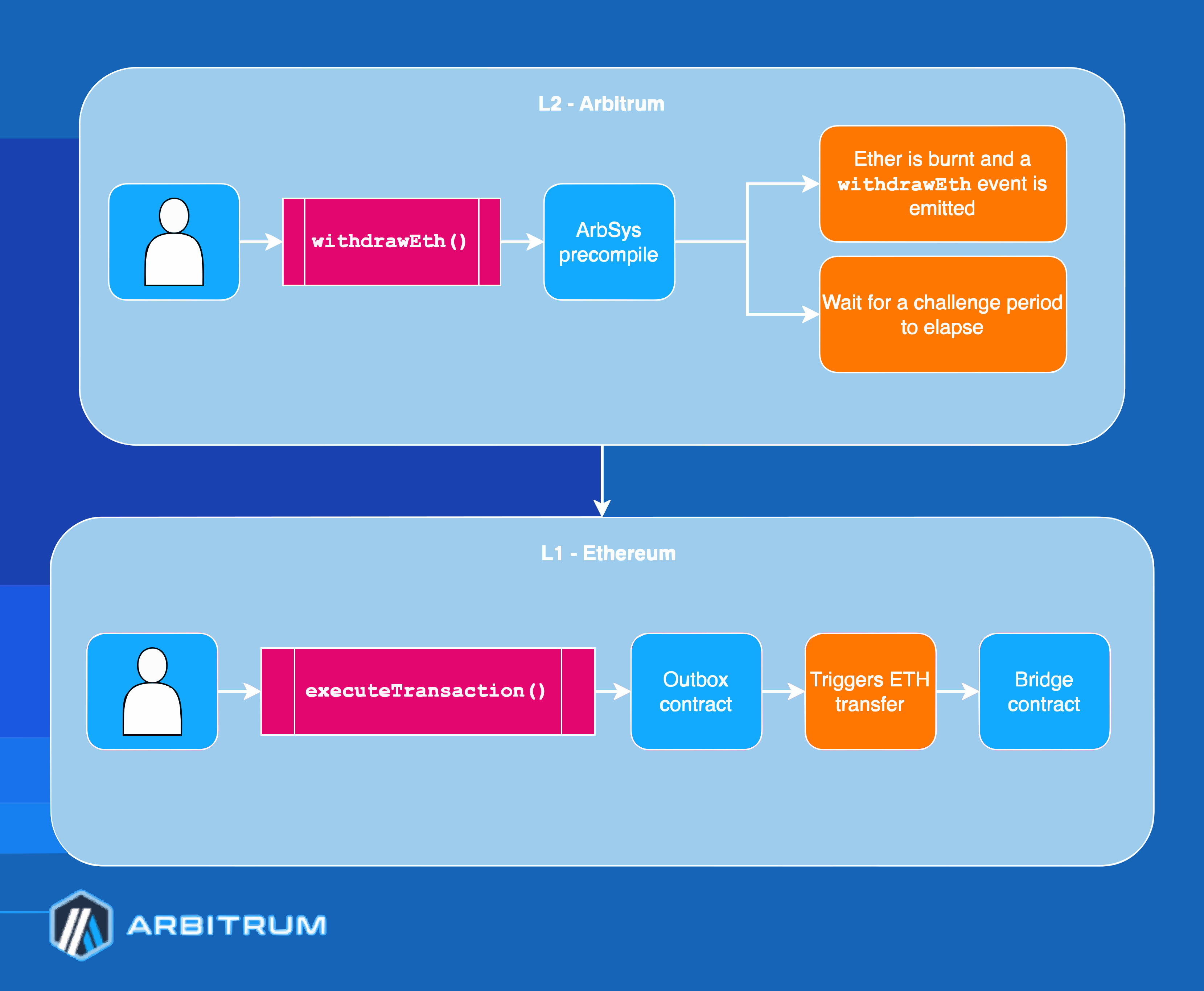
How ETH withdrawal works
- On the child chain: The ETH balance is burned, and a message is created
- Challenge period: Wait 6.4 days for the to finalize
- On the parent chain: Execute via
Outbox.executeTransactionto claim your ETH
ArbSys.withdrawEth is equivalent to calling ArbSys.sendTxToL1 with an empty calldata argument. Like any child-to-parent message, it requires executing on the parent chain after the dispute period.
Example: withdrawing ETH
const arbSys = new ethers.Contract('0x0000000000000000000000000000000000000064', arbSysABI, childChainSigner);

// Withdraw 0.1 ETH
const tx = await arbSys.withdrawEth(parentChainAddress, {
  value: ethers.utils.parseEther('0.1'),
});
const receipt = await tx.wait();

// After 6.4 days, execute on parent chain using the steps above
The withdrawal process:
Withdrawing ERC-20 tokens
For ERC-20 token withdrawals, see the dedicated Withdraw tokens guide, which provides detailed instructions for using Arbitrum's canonical token .
Using the Arbitrum SDK
The Arbitrum SDK simplifies child-to-parent messaging:
import { ChildToParentMessageStatus, ChildTransactionReceipt } from '@arbitrum/sdk';

// Get the L2 transaction receipt
const l2Receipt = await childChainProvider.getTransactionReceipt(l2TxHash);
const childTxReceipt = new ChildTransactionReceipt(l2Receipt);

// Get child-to-parent messages from the transaction
const messages = await childTxReceipt.getChildToParentMessages(parentChainSigner);

// Wait for the message to be executable
const message = messages[0];
await message.waitUntilReadyToExecute(childChainProvider);

// Execute the message on the parent chain
const executeResult = await message.execute(childChainProvider);
await executeResult.wait();
Withdraw ETH using the Arbitrum SDK
The SDK also provides an EthBridger class that simplifies ETH withdrawals:
import { getArbitrumNetwork, EthBridger } from '@arbitrum/sdk';
import { ethers } from 'ethers';

const childNetwork = await getArbitrumNetwork(childProvider);
const ethBridger = new EthBridger(childNetwork);

// Initiate withdrawal from child chain
const withdrawTx = await ethBridger.withdraw({
  amount: ethers.utils.parseEther('0.1'),
  childSigner,
  from: walletAddress,
  destinationAddress: walletAddress,
});
const withdrawReceipt = await withdrawTx.wait();

// Get child-to-parent events for later outbox execution
const withdrawEvents = withdrawReceipt.getChildToParentEvents();
After the 6.4-day challenge period, use the outbox execution flow described above (or the SDK's ChildToParentMessage.execute) to claim your ETH on the parent chain.
For a complete example, see the eth-withdraw tutorial.
Message lifecycle
Child-to-parent messages go through these stages:
| Stage | Description |
|---|---|
| Posted on child chain | The message is sent via ArbSys.sendTxToL1 |
| Waiting for finalization | The assertion containing the message is in the challenge period (6.4 days) |
| Confirmed and executable on parent chain | The assertion is confirmed, and the message can be executed in the outbox |
Next steps
- For protocol-level details, see Child to parent chain messaging
- For token bridging concepts, see Token bridging overview
- For the Arbitrum SDK documentation, see Arbitrum SDK
How is this guide?
Tokens
Step-by-step guide to depositing ERC-20 tokens from Ethereum (parent chain) to an Arbitrum child chain using the token bridge gateway system and Arbitrum SDK.
Tokens
Step-by-step guide to withdrawing ERC-20 tokens from an Arbitrum child chain back to Ethereum (parent chain) using the token bridge gateway system, including the 6.4-day challenge period.